EightySixOS Website Editor
Change your own website by asking for it.
Go to your own website, type what you want changed, and it happens. No code, no waiting on someone else, and no invoice for changing one sentence.
Live and in use on real websites today. We set it up for your site, so ask us first.
The problem
A great website you are not allowed to touch.
Hand-built sites are fast, cheap to run and hard to break. That is why yours was built this way. The catch is that there is no admin area to log into, so changing one sentence is not something you can do yourself.
So a sentence needs changing and you send an email. A photo needs swapping and you send an email. Then you wait, and then there is a bill for twenty minutes of somebody's time. The change was small. Everything around it was not.
The usual advice is to rebuild the whole thing in something you can log into, which means giving up a fast site to solve a problem that was never really about the site.
How it works
Four steps, three of which you never see.
01
You ask
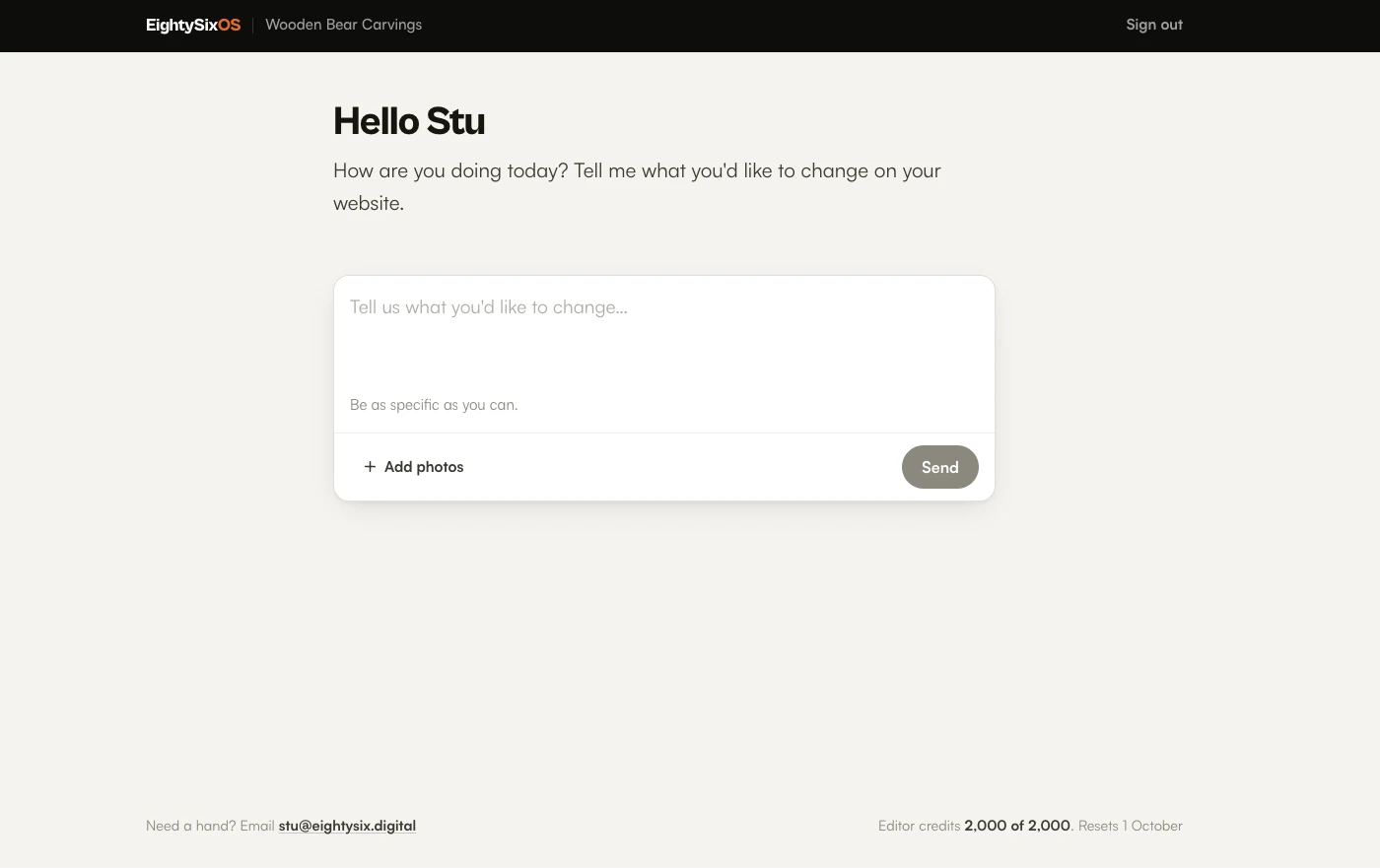
On your own website, at /editor. Describe the change the way you would say it out loud, including "the button at the bottom".
02
It reads your site
Your real website, not a copy or a guess. It finds the thing you mean and works out what has to change.
03
It checks itself
The change is read back against your real website before anything is saved. If it does not look right, nothing is saved and your site is untouched.
04
It goes live
Usually within a few minutes. You are told when it is done, and told just as plainly if it did not work.
What it changes
The things you would otherwise email about.
Your website is set up with what it is allowed to change, so it only ever offers what your site actually has.
Words on a page
Your opening hours, the paragraph that has read badly since the day it went live, the phone number that changed.
Titles and descriptions
The wording that shows in Google, without opening anything that looks like code.
Photographs
Take one on your phone and attach it. It is resized before it is sent, so a huge photo straight off the camera is fine.
Blog posts
Write one, edit an old one, or ask for help writing it. On sites that have a blog.
Products
Add something you are selling: photos, a name, a price, and a description written for you if you would rather not.
Links and buttons
Say which one you mean the way you would out loud. The button at the bottom, not the identical one at the top.
Why it is safe to hand over
You cannot break it by using it.
It works out what you meant. It does not get the final say. Every change is checked against your real website before anything is saved, and sounding sure is not the same as being right.
It checks itself before anything happens
The change is read back against your real website before it is saved. If it does not look right, nothing is saved at all and your site is exactly as it was.
It can only touch your content
Your website is set up with what may be changed. The parts that make it work, and anything holding a password or a key, are off limits and cannot be reached however the request is worded.
You are told if something goes wrong
If a change cannot be published, your website carries on exactly as it was and you are told plainly. You are never left waiting for something that is not coming.
Anything can be undone
Every change is recorded with what it was and when. If you change your mind, or something is not right, putting it back is a small job rather than a rescue.
Signing in
No password to forget.
Type your email address and you get a link. Nothing to invent, nothing to reset, nothing to write on a note by the till. If you have ever given up on a website because you could not get past the login, that is the part we took out.
What it costs to run
A monthly allowance per site.
Your website has a monthly allowance, shown as credits counting down in the corner. Ordinary changes use very little of it. If you run out it stops until the month turns over, so nothing can quietly run up a bill while you are not looking.
What it is not
Worth knowing before you ask.
It is not a website builder. It changes the words and pictures inside the site you already have. It will not move your layout around or redesign a page, which is the point: the reason your site is fast is that it was built properly and left alone.
We set it up for your site. It has to be told where your content lives and what may be changed before it can do anything. That is a short job at our end, and it is why there is no button here that switches it on by itself.
It does not suit every website. If your site runs on WordPress or something similar, you already have a way in and this is not for you. It is for sites with no admin area, where changing anything currently means asking the person who built it.
Questions
Straight answers.
Can I use it now?
Yes. It is live and in use on real websites. It is set up for your site by EightySix Digital rather than being something you sign up for and point at a website, because it has to be told where your content lives before it can change anything.
Will it work with my website?
It is built for fast, hand-built and static sites, the kind that load quickly and have no admin area to log into. If your site was built for you and you have been told you need a developer to change anything on it, it is probably the right sort. Ask and we will tell you straight.
Do I need to know anything technical?
No. You type what you want changed the way you would say it to the person who built the site. There are no files, no menus of settings and nothing to learn between the times you need it.
Can I break my website with it?
It is built so that you cannot. The change is checked against your real website before anything is saved, and a change that does not pass is not saved at all. If something does go wrong after that, your website carries on exactly as it was and you are told the change did not go through.
How do I log in?
You type your email address and we send you a link. There is no password to invent, forget or reset.
How much can I change each month?
Each website has a monthly allowance, shown as credits counting down in the corner. Ordinary changes use very little of it. If you run out, it starts again at the beginning of the next month.
Will it redesign my pages?
No, and that is deliberate. It changes the words and pictures inside the site you already have. The design, the speed and the layout stay exactly as they were built, which is usually the reason the site is worth keeping.
Does my developer still have a job?
Yes. This is for the small things you would otherwise email about and wait on: a paragraph, an opening time, a photo, a phone number. Anything that means new pages, new features or a new design is still work for whoever built it.
Ask about the Editor
Stop emailing someone to change a sentence.
The Editor is set up for a specific site by hand, because it has to be told where your content lives before it can change anything. Send the address of your website and you will get a straight answer on whether yours is a fit, before anybody pays for anything.
Want the rest of it instead? What EightySixOS Solo does