Technical SEO
Technical SEO checks without the technical headache.
EightySixOS regularly checks your website for common technical SEO problems, and tells you plainly which ones actually deserve your attention.
Why built in
You shouldn't need to be an SEO expert to read a crawl report.
Tools like Screaming Frog and Sitebulb are excellent at deep, one-off crawls for people who already know SEO. EightySixOS isn't trying to replace them. It checks your site regularly and turns what it finds into a short, understandable list of what's actually worth fixing.
The export problem
A standalone crawler hands you a spreadsheet of hundreds of rows. Useful if you already know SEO. If you don't, it's just a wall of jargon with no clear next step.
The memory problem
A one-off audit has no memory of your site. It can't tell you what's new, what you already fixed, or whether something you fixed last month has quietly come back.
The severity problem
Not every issue matters equally. A crawler that treats a missing alt tag the same as a broken page buries the one thing actually worth your time this week.
Find what needs attention
A health score, and the reason behind every issue.
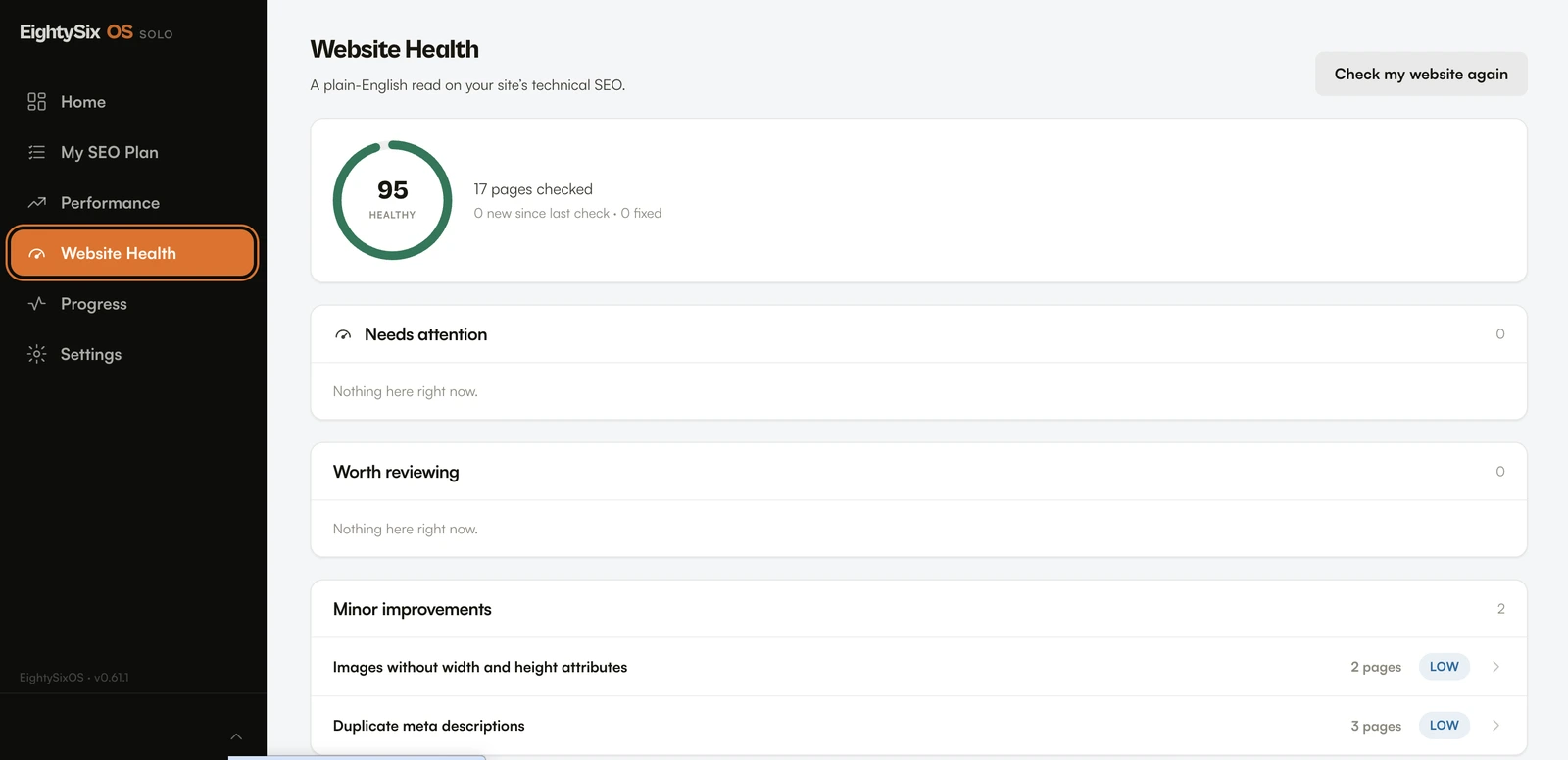
Each check scores your site out of 100 and ranks what it finds by severity, grouped into needs attention, worth reviewing, and minor improvements. Every issue comes in plain language: what it is, why it matters, and which pages it affects.
The checks are deterministic, so they only fire on a genuine problem. A clean check tells you how many pages were checked, rather than inventing issues to fill the page.
What it checks
Five categories. One health score.
An HTTP-first crawler fetches and parses each page, follows internal links, and reads your XML sitemap, so every finding traces back to real evidence, not a black box. The checks group into five categories, each rolling up into one number.
Crawlability
Can search engines reach every page?
Flags pages that time out, fail to fetch, or return a 4xx or 5xx status, plus internal images that never load. If search engines can't fetch it, nothing else matters.
Indexability
Will the pages you want indexed get indexed?
Checks the URLs in your sitemap for the quiet contradictions: ones blocked to Googlebot, marked noindex, redirecting, erroring, or pointing their canonical somewhere else.
Canonicals & redirects
Is there one clear version of each page?
Surfaces pages with no canonical, more than one canonical, a canonical on another domain, and redirect chains longer than a single hop.
Metadata
Does every page describe itself clearly?
Finds missing, duplicated or repeated titles, meta descriptions and H1s, invalid structured data, and images with missing or filename-only alt text.
Site structure
Does the internal structure hold together?
Catches orphaned pages with no internal links to them, indexable pages missing from the sitemap, broken internal links, and oversized or unsized images.
From finding to fixed
An issue shouldn't just sit on a list forever.
This is the part a one-off crawl export can't do. Fix the issue, and the next check confirms it, automatically. No re-running a separate tool to check your own work.
Part of one system
The crawler isn't the product. It's one part of it.
Website Health sits alongside your Google performance, your weekly SEO plan, and Ask EightySixOS. The check finds it, your plan tells you what to do about it, and Progress shows whether it's been fixed. Not five tools. One system.
Questions
The honest answers.
Is this a replacement for Screaming Frog or Sitebulb?
No. Those are excellent dedicated crawlers, built for people who already know how to use them. EightySixOS is deliberately smaller in scope: it checks your site regularly and explains what it finds in plain English, so you don't have to interpret a technical export yourself.
How does the crawler work?
It's an HTTP-first crawler. It fetches and parses each page, follows internal links, and reads your XML sitemap. Every finding traces back to something it actually fetched, not a guess.
What does it check?
Dozens of checks across five categories: crawlability, indexability, canonicals and redirects, metadata, and site structure. They roll up into a single health score out of 100, with issues ranked by severity.
Can I check my site on demand, or does it just run on a schedule?
Both. A check runs on a weekly schedule automatically, and you can also check your website again whenever you want. Every check is compared against the previous one, so you can see what's new and what's been fixed.
Will it help with AEO or GEO too?
A technically accessible, well-structured website is also easier for answer engines and AI-driven search tools to read, so this does support that indirectly. It's still a technical SEO crawler, not a separate AEO or GEO scoring tool.
Know when your website has SEO problems.